01 ·
Intercepter avant, pas après
90 % des solutions agissent sur l'e-mail avant livraison. Fortgale opère là où les filtres traditionnels échouent : sur la page de destination, au moment où l'utilisateur est sur le point de livrer ses identifiants.

La plupart des solutions anti-phishing agissent après la compromission. Fortgale intercepte l'attaque au moment exact où l'utilisateur s'apprête à saisir ses identifiants, et la bloque.
L'Interceptor prévient la compromission initiale. ITDR gouverne la sécurité des identités à 360°. Ensemble : défense pré- et post-compromission.
90 % des solutions agissent sur l'e-mail avant livraison. Fortgale opère là où les filtres traditionnels échouent : sur la page de destination, au moment où l'utilisateur est sur le point de livrer ses identifiants.
L'Interceptor prévient la compromission initiale ; ITDR gouverne la sécurité des identités à 360° de l'AD au Cloud. Défense pré + post compromission.
Analyse en temps réel côté client. Aucun DNS, serveur mail ou tenant à modifier. Onboarding en quelques heures.
L'e-mail arrive. Les filtres SEG, sandbox et DNS ne l'arrêtent pas : le message est propre, le lien pointe vers un domaine récent.
L'utilisateur clique. Le navigateur ouvre une page qui imite le portail M365 d'entreprise (ou Google Workspace).
L'Interceptor analyse la page côté client : fingerprint, pattern URL, structure DOM. L'identifie comme du phishing.
Avertissement bloquant avant la saisie des identifiants. Aucun identifiant n'est jamais transmis. Événement envoyé au tableau de bord CISO.
Opère sur la page de destination, pas sur l'e-mail. Efficace post-filtre.
Côté client, pas de serveur proxy, pas de latence perceptible pour les utilisateurs.
Pas de modification du DNS, des serveurs mail ou du tenant M365. Activation en quelques heures.
Couverture complète des deux environnements SaaS leaders. Bilingue FR/EN.
Alimenté par le Fortgale Intelligence Feed : 34 000+ IoC par semaine, infrastructure de phishing mise à jour en continu.
Tableau de bord des attaques interceptées, utilisateurs concernés, secteurs cibles. Reporting CISO avec tendances et MTTD/MTTR.
Lorsqu'une identité est déjà compromise, le Fortgale ITDR détecte et répond en temps réel.
Détection de Kerberoasting, Pass-the-Hash, DCSync, Golden Ticket, mouvement latéral, modifications GPO critiques.
MFA Bypass, vol de Token, abus de Service Principal, attaques Hybrid Identity, OAuth illicit consent grant.
Baseline comportementale sur les utilisateurs privilégiés, détection des menaces internes, détection d'anomalies sur les accès et impossible geo-velocity.
Isolation de compte, révocation de token, évaluation du blast radius, remédiation guidée, durcissement post-incident.
Analyse technique de l'attaque Adversary-in-The-Middle : anatomie de la kill-chain, frameworks Evilginx/Modlishka/Muraena.
Deep dive AiTM →Sécurité des identités à 360° de l'AD on-prem à Entra ID et Cloud. Détection & réponse sur les identifiants compromis.
Découvrir ITDR →EDR/XDR gouverné par le SOC européen. Triage en <15 min, confinement <30 min.
Découvrir MDR →Il intercepte au moment le plus critique, lorsque l'utilisateur est sur le point de saisir ses identifiants sur une page malveillante. Détecte les caractéristiques de la page, affiche un avertissement, empêche la saisie. Côté client, zéro latence, zéro impact opérationnel.
Oui. Extension à Google Workspace : les campagnes de credential harvesting Google sont fréquentes dans l'industrie, la logistique et les services professionnels. Logique identique.
Identity Threat Detection & Response : sécurité des identités d'entreprise à 360°. De l'AD on-prem à Entra ID, environnements hybrides et multi-cloud. Surveillance continue, détection d'anomalies, identity incident response, remédiation guidée.
Banque/finance, transport maritime, industrie, infrastructures critiques, santé, retail, juridique et au-delà. Le phishing ne discrimine pas : la protection est efficace quel que soit le secteur car elle opère sur le comportement utilisateur.
Formulaire de demande → l'équipe Fortgale vous contacte dans les 24 heures ouvrées → onboarding sans modifications d'infrastructure en quelques heures.
Credential harvesting, BEC, lookalike domains, infostealer logs sur forums underground : nous surveillons toute la chaîne du phishing qui frappe les entreprises européennes. Nos détections viennent de cette recherche, pas de feeds publics recyclés.
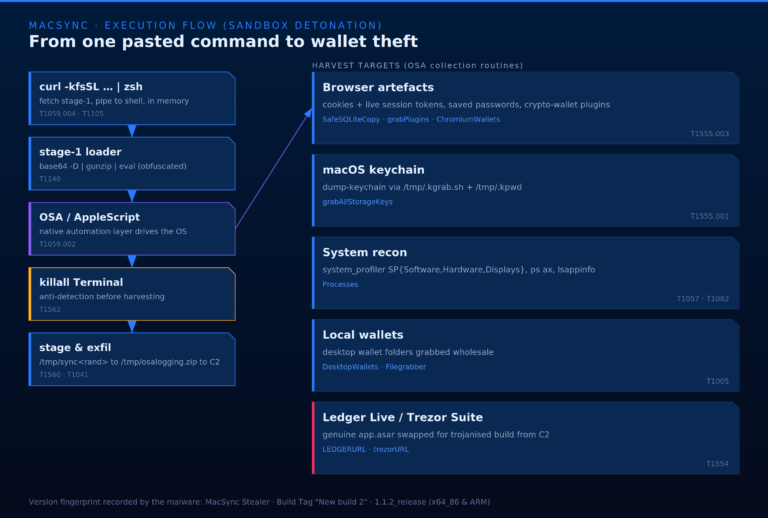
No exploit. No attachment. No phishing email. In this campaign the threat actor needs the victim to do exactly one thing: copy a command from an installation guide and paste it i…
Lire l'article →
ABSTRACT The FBI recently issued an advisory on Kali365, a Phishing-as-a-Service platform that abuses legitimate Microsoft OAuth flows to bypass multi-factor authentication. Kali…
Lire l'article →
Intelligence · Phishing Kit · Q1 2026 April 24, 2026Fortgale CTI14 min readRPT-26-0424 Observation of the quarter The 2026 phishing ecosystem has outpaced traditional defenses. M…
Lire l'article →
In the high-stakes world of venture capital and corporate funding, where millions hang in the balance and sensitive financial data flows freely, a new breed of cyber threat is em…
Lire l'article →
In February 2026, the Fortgale Incident Response team investigated a multi-stage intrusion attributed to Mora_001, a Russian-origin threat actor exploiting Fortinet vulnerabiliti…
Lire l'article →
UPDATES: 27.11.2024: As mentioned by TrustWave, "Supercar Phishing Kit" has an high level of overlapping with the most recent update of "Rockstar 2FA Phishing-as-a-Service" 26.09…
Lire l'article →Pas de funnel. Pas de démo générique. Nous vous apportons un Report construit sur votre secteur et des analystes avec autorité de décision.
Aucune séquence de nurturing, aucune réponse automatique. Un de nos analystes vous rappelle sous un jour ouvré.
Le Report complet (executive summary · IoC opérationnels · runbook technique) est confidentiel. Envoyez-nous deux informations et un de nos analystes vous recontacte avec l'accès et un bref briefing technique.
Réponse en 30 minutes, confinement en 1 à 4 heures. Même si vous n'êtes pas client Fortgale.